TCGScan - Poke Card Scanner
4.4 21.00 Reviews
Analysis By AppCompare
I like card-collecting apps that save me from switching between a camera, a search engine, and a spreadsheet, and TCGScan - Poke Card Scanner is built around exactly that kind of quick check. It is a sports-category app from PIXELDRILL that lets me scan Pokémon cards, look up their value, follow price movement, and keep an eye on a collection. I found the idea most useful when I wanted a fast answer while sorting cards, rather than a full replacement for careful research.
The app is free to install and suitable for everyone, which makes it easy to try without committing money first. Its current version is 2.9, and it runs on Android 8.0 or later. The store page shows a 4.4 average from around two thousand ratings, with more than one hundred thousand installs. Those figures suggest that it has moved beyond being an obscure experiment, although I would still treat every automated card result as a first estimate rather than a final sales decision.
How TCGScan fits into a real card-collecting routine
A useful starting point for sorting cards
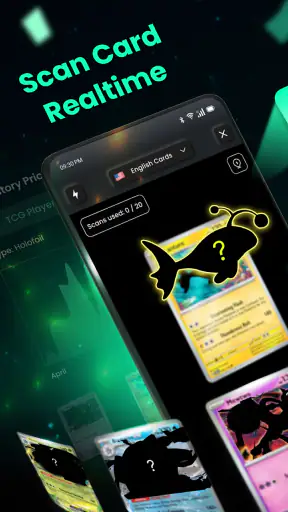
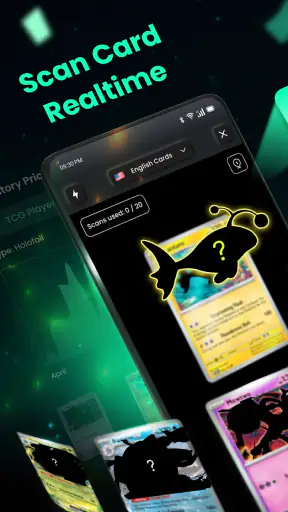
The strongest part of the experience is the basic workflow: point the phone at a card, let the app identify it, and use the result as a starting point for checking its value. That is much more practical than typing a long card name, set name, or collector number by hand. When a collection contains cards from several eras, this shortcut can turn an untidy pile into a manageable sorting session.
I would use it first after opening a box of mixed cards, before putting anything into sleeves or storage pages. Scanning as I go helps separate cards that deserve closer attention from ordinary duplicates. It is also handy at a trade table, where I may not have time to perform a detailed manual search for every card. The app’s value is therefore less about replacing judgment and more about reducing the boring identification work around it.
There is an important practical habit here: keep the card flat, use even light, and make sure the camera can see the printed details clearly. A reflective sleeve, a bent card, or a busy background can make recognition less dependable. I get better results when I remove a card from a glossy sleeve briefly or tilt it away from direct light. That small preparation step matters more than rushing the camera toward a large stack.
Where the price tools help, and where they do not
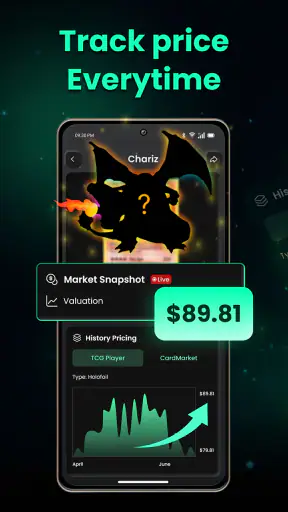
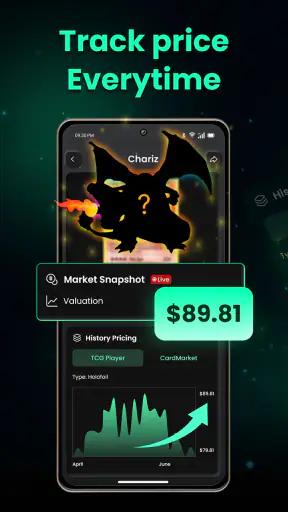
Once a card is recognized, the price and tracking side of the app gives the collection more context than a simple scanner. I can use it to notice which cards are worth monitoring and which ones are unlikely to justify a long research session. Price tracking is especially useful for cards I might sell later, because it encourages me to look at movement over time instead of reacting to one exciting number.
Still, a displayed value should not be confused with a guaranteed selling price. Condition, centering, language, edition, holo pattern, and the difference between an asking price and a completed sale can all change what a buyer will actually pay. A scanner may identify the right card while a worn copy is worth far less than a near-mint example. I would always inspect the physical card separately before listing it or using it in a trade.
That distinction is one of the app’s most important lessons for newcomers. TCGScan can help answer “What might this be?” faster, but it cannot remove the need to understand grading and market context. For a casual collector, that is a reasonable balance. For someone pricing a valuable collection, the app should sit at the beginning of the process, followed by manual comparison with current marketplace listings and recent completed sales.
A collection workflow that stays manageable
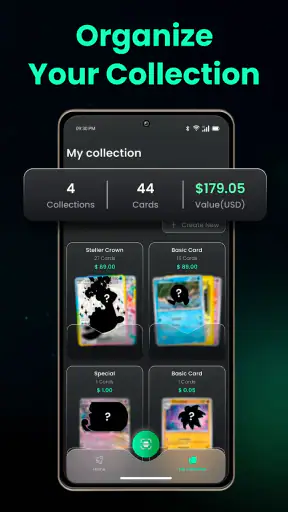
The collection feature becomes more useful when I treat it as an inventory tool rather than a trophy cabinet. After scanning, I would record cards in small batches and immediately separate duplicates, cards for trade, and cards I intend to keep. Doing this during the first sorting session avoids the common problem of scanning everything and then forgetting which physical card matches which digital entry.
A helpful approach is to work by storage box or binder page. If I scan one container at a time, the app’s records remain easier to reconcile with the cards in front of me. I can also use the price-tracking function selectively instead of following every card. Tracking only cards that I may trade, sell, or watch for collecting reasons keeps the information useful and prevents the collection from becoming a noisy list of changing values.
This is a less obvious strength of the concept: the scanner is most valuable when it changes how I organize my time. It can identify the cards that deserve attention, while the collection record gives me a place to return later. It is not just a camera trick; it can become a lightweight system for deciding what to inspect next.
What the current release tells me
Seeing version 2.9 tells me that the app has gone through continued development rather than remaining at its first release. It was released on March 21, 2024, so the product is still relatively young compared with long-established collection databases. I see that as encouraging for the basic direction, but I would keep expectations realistic: a newer app can improve quickly while still having rough edges in recognition, organization, or market presentation.
For an existing user, a later version is relevant because it indicates that the developer, PIXELDRILL, has continued to maintain the product. The practical effect is that I would install the current release rather than judge the app by an early experience or an old screenshot. At the same time, version progress alone does not prove that every difficult card is recognized perfectly. I would still verify unusual prints, older cards, and anything with a high financial value.
The sensible way to assess future updates is to watch whether they improve the parts that affect daily use: recognition under ordinary lighting, handling of duplicates, clearer price context, and smoother collection editing. Those changes would matter more to me than cosmetic adjustments. A scanner earns trust through consistent results during messy, real-world sorting, not simply through having a newer version number.
How it compares with manual searches and spreadsheets
Compared with searching card names manually, TCGScan is faster when the card is easy for the camera to identify. Manual searching still wins when I need to distinguish similar versions, investigate condition, or confirm details that a quick scan may overlook. I see the two methods as partners: scanning handles discovery, while a browser or specialist marketplace handles verification.
Compared with a spreadsheet, the app is more convenient at the moment of identification. I do not have to create columns for every card before I know what I am holding. A spreadsheet can be better for advanced budgeting, purchase history, insurance records, or highly customized categories, because I control every field. Someone with a very large collection may eventually want both: TCGScan for quick intake and a more detailed system for long-term administration.
It also differs from relying on a local card shop. A shop employee can sometimes spot condition issues, unusual variants, or market details that software will miss, while the app is available during an evening sort at home. If I were preparing a serious sale, I would use the app to narrow the pile and then ask an experienced buyer or collector to review the most important cards. Convenience is the advantage here, not absolute authority.
A realistic everyday example
Imagine I inherit a shoebox of mixed Pokémon cards from a family member. I do not know the sets, and I do not want to spend an entire evening searching each printed name. I would clean a small workspace, remove glare, and scan cards one by one. The first pass would be about identification, not selling. I would separate obvious duplicates and place potentially important cards in sleeves rather than repeatedly handling them.
Next, I would compare the app’s results with the card’s visible condition. A scratched surface, whitening along the edges, or a crease changes the conversation immediately. I would add the cards worth following to my collection and use price tracking for the ones I may decide to sell. Only after that would I research current listings and decide whether a local trade, online sale, or personal collection makes sense.
That workflow shows both the benefit and the limit of the app. It might reduce hours of initial searching, but it does not turn an unknown collection into guaranteed cash. The human decisions remain important, especially when two cards look nearly identical or when condition separates a common item from a meaningful find.
Who will get the most from it
I would recommend TCGScan to casual Pokémon collectors, parents helping children sort cards, newcomers who do not yet know set symbols, and traders who need quick identification before doing deeper research. It is also a sensible companion for someone building a collection gradually, because scanning cards as they arrive is less overwhelming than trying to reconstruct an inventory months later.
The app is particularly appealing if the alternative is doing nothing. Many collections stay disorganized because manual entry feels like work. A camera-first workflow lowers that barrier. Even an imperfect first pass can reveal what needs attention and help a collector make better decisions about sleeves, binders, trades, and storage.
I would be more cautious about recommending it as the only tool for professional sellers, serious investors, grading preparation, or anyone dealing with rare cards where a small identification error has a large financial consequence. Those users need detailed condition assessment, variant verification, and sale-price research. The app can support that process, but it should not be the final judge.
Small frictions and the cost question
The free entry point is a clear advantage, but the app includes in-app purchases ranging from $3.99 to $39.99 per item. That means I would try the core workflow first and decide whether the paid options genuinely save enough time for my collection. A casual user who scans occasionally may not need to spend anything, while a frequent collector may see more value in expanded tools if they use them regularly.
My main friction is the unavoidable uncertainty of camera recognition. Cards with glare, unusual layouts, low contrast, or similar artwork demand extra checking. That is not a flaw unique to this app, but it affects how confidently I would act on a result. I also would not want to scan an entire collection in one rushed session and assume the digital record is perfect. A slower, organized process produces a much more trustworthy inventory.
There is also a behavioral trade-off. Price tracking can make collecting feel more like watching a market than enjoying the cards. I would use it to inform decisions, not to let every price movement determine what I keep. For children and families, the collection side may be more rewarding when it supports sorting and learning rather than turning every card into a potential sale.
Privacy, permissions, and sensible habits
Because scanning depends on the phone camera, I would pay attention to the access request during installation and use the app only in a setting where I am comfortable photographing the cards. I would avoid placing personal documents, faces, addresses, or unrelated items in the frame. A clean desk and a deliberately narrow camera view are good habits for both recognition quality and general privacy.
I would also keep a simple backup record for cards that matter most. Even if the app is convenient, valuable collection information should not exist in only one place. A note containing the card name, condition, and storage location is enough for the key items. This is not because the app is unsuitable; it is because any digital collection tool is easier to replace than a rare card is to replace.
What I would watch in future updates
For the product to become a stronger long-term companion, I would watch how it handles near-identical cards, condition-related value differences, and corrections after a scan. Easy editing is crucial: when the first result is wrong, I want to fix the record without starting the entire process again. Better separation between identification, estimated value, and personal collection notes would also make the app more useful for serious sorting.
I would also look for improvements that make price tracking easier to interpret. A changing number is only helpful when I understand what it represents and when it reflects the specific version of the card in my hand. Clearer context would reduce the risk of a beginner treating an optimistic estimate as a promise. These are the areas that would most affect my confidence as the collection grows.
For now, I see TCGScan as a practical first layer: quick enough for sorting, approachable enough for beginners, and useful for deciding which cards deserve closer attention. Use it as a fast identification and organization assistant, not as a substitute for condition checks and market research. That mindset gives the app room to be genuinely helpful without asking it to do a job it was never meant to do.
My final recommendation is positive for collectors who want to turn a pile of cards into an organized starting point. The free download makes experimenting easy, the current release shows ongoing development, and the combination of scanning, collection tracking, and price watching covers more of the everyday workflow than a basic manual search. I would skip it if I need professional-grade valuation or a fully customizable inventory from the first scan. For everyone else, TCGScan - Poke Card Scanner is worth trying, provided I verify important results before trading, selling, or making storage decisions.
FAQ
What is TCGScan - Poke Card Scanner used for?
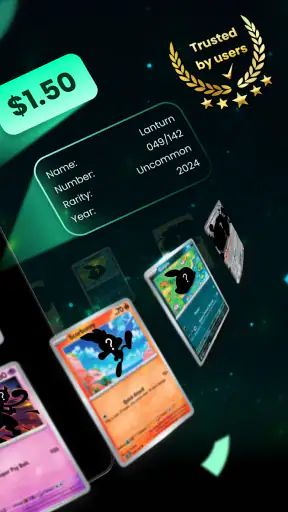
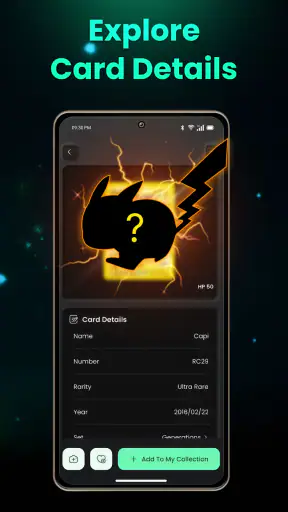
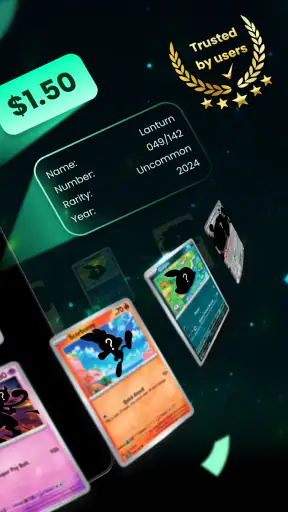
TCGScan - Poke Card Scanner is designed to help Pokémon Trading Card Game collectors identify cards using their phone’s camera. After scanning a card, the app can provide useful information such as the card name, set, number, estimated market value, and collection details, depending on the available database and the app’s current features. It is especially useful for quickly organizing cards or checking a large collection.
How accurately does TCGScan recognize Pokémon cards?
Recognition accuracy can vary depending on the card’s condition, lighting, camera focus, language, and how clearly the card is positioned in the frame. Cards with damaged surfaces, unusual borders, promotional layouts, or limited database support may require manual correction. In our experience, scanning works best when the card is placed on a flat, contrasting surface with good lighting and minimal glare. Always verify important results before selling or trading.
Can TCGScan show the current value of my Pokémon cards?
The app may display price information for recognized cards, but values should be treated as estimates rather than guaranteed selling prices. Pokémon card prices change frequently according to condition, edition, grading, demand, marketplace, and recent sales. A displayed value may also depend on the selected currency or price source. For valuable cards, compare several marketplaces and confirm the exact set, printing, language, and condition before making financial decisions.
Does TCGScan require an internet connection or an account?
Many card-scanning applications need an internet connection to identify cards, retrieve updated card information, synchronize collections, or load market prices. Some features may be limited when the device is offline. Depending on the version, TCGScan may also offer or require an account for saving collections across devices and backing up data. Review the permissions and sign-in requirements during setup, especially if you prefer not to create an account.
Is TCGScan free to download, and are there in-app purchases?
TCGScan can generally be downloaded without an upfront charge, but availability of features may depend on the app’s current pricing model. Some tools, such as unlimited scans, advanced collection management, price tracking, cloud synchronization, or removal of advertisements, may be offered through subscriptions or in-app purchases. Before scanning an entire collection, check the store listing and subscription screen carefully so you understand any trial period, renewal terms, and cancellation options.
Pros
- Quickly identifies Pokémon cards using the phone camera.
- Useful for checking current market prices before trading or selling.
- Supports collection tracking and helps organize cards digitally.
- Can reveal card details without manually searching each set.
- Helpful for spotting valuable cards in a large collection.
Cons
- Recognition may fail with damaged
- sleeved
- or poorly lit cards.
- Price estimates can vary by condition
- language
- and marketplace.
- Some features may require a subscription or in-app purchase.
- Market values can change quickly
- so results may become outdated.
- Camera scanning may use noticeable battery during large collection scans.